Authentication: Gateway Login
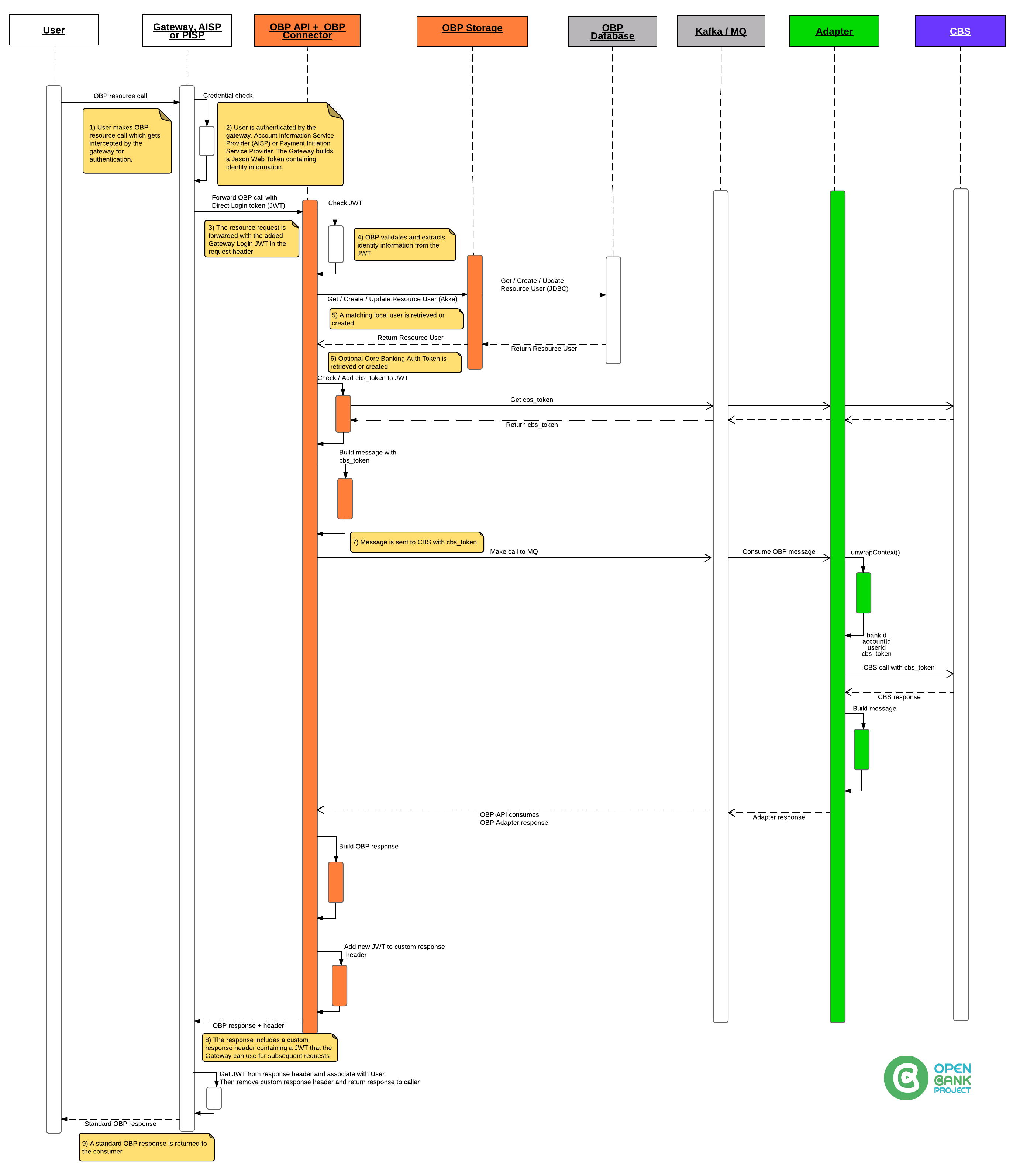
|Note: Gateway Login is NOT enabled on this instance! | |Gateway Login allows a gateway (e.g. API Gateway) to authenticate on behalf of a user.
The gateway sends a JWT in the Authorization header. The JWT is signed with a shared secret between the gateway and OBP. This method does not require a separate token-obtaining step — the JWT is sent directly with each API request.
GET https://obp-api-sandbox.nmbbank.co.tz/obp/v7.0.0/my/banks
Authorization: GatewayLogin token="your-jwt-token"
Notes
- Gateway Login is intended for trusted infrastructure, not end-user applications.
- The JWT must be signed with the pre-shared secret configured on the OBP instance.
- Contact your OBP administrator for gateway integration details.
|
|
 |
|---
|
|### Administrator Guide: Configuration and JWT Details
|
|The Gateway is responsible for creating a token which is trusted by OBP absolutely.
|When OBP receives a token via Gateway Login, OBP creates or gets a user based on the username supplied.
|
|### 1) Configure OBP API to accept Gateway Login
|
|Set up properties in a props file:
|
|
|
|---
|
|### Administrator Guide: Configuration and JWT Details
|
|The Gateway is responsible for creating a token which is trusted by OBP absolutely.
|When OBP receives a token via Gateway Login, OBP creates or gets a user based on the username supplied.
|
|### 1) Configure OBP API to accept Gateway Login
|
|Set up properties in a props file:
|
||# -- Gateway login -------------------------------------- |# Enable/Disable Gateway communication at all |# In case isn't defined default value is false |# allow_gateway_login=false |# Define comma separated list of allowed IP addresses |# gateway.host=127.0.0.1 |# Define secret used to validate JWT token |# jwt_token_secret=your-at-least-256-bit-secret-token |# -------------------------------------- Gateway login -- || |The property jwt_token_secret is used to validate the JWT token to check it is not changed or corrupted during transport. | |### 2) JWT Structure | |HEADER: | ||{ | "alg": "HS256", | "typ": "JWT" |} || |PAYLOAD: | ||{ | "login_user_name": "username", | "is_first": false, | "app_id": "85a965f0-0d55-4e0a-8b1c-649c4b01c4fb", | "app_name": "GWL", | "time_stamp": "2018-08-20T14:13:40Z", | "cbs_token": "your_token", | "cbs_id": "your_cbs_id", | "session_id": "123456789" |} || |### Example python script | ||import jwt |from datetime import datetime, timezone |import requests | |obp_api_host = 'https://yourhost.com' |payload = { | "login_user_name": "username", | "is_first": False, | "app_id": "85a965f0-0d55-4e0a-8b1c-649c4b01c4fb", | "app_name": "Name", | "time_stamp": datetime.now(timezone.utc).strftime(DATE_FORMAT), | "cbs_token": "yourtokenforcbs", | "cbs_id": "yourcbs_id", | "session_id": "123456789" |} | |token = jwt.encode(payload, 'your-at-least-256-bit-secret-token', algorithm='HS256') |authorization = 'GatewayLogin token="{}"'.format(token) |headers = {'Authorization': authorization} |url = obp_api_host + '/obp/v6.0.0/users/current' |req = requests.get(url, headers=headers) |print(req.text) || |### Under the hood | |The file GatewayLogin.scala handles the Gateway Login: | ||-> Check if Props allow_gateway_login is true | -> Check if GatewayLogin header exists | -> Check if getRemoteIpAddress is OK | -> Look for "token" | -> If "is_first" is true -OR- CBS_auth_token is empty then, call CBS to get accounts || |The CBS_auth_token (either the new one from CBS or existing one from previous token) is returned in the GatewayLogin custom response header. |